<?xml version="1.0" encoding="UTF-8"?>
<!--Generated by Squarespace V5 Site Server v5.13.594-SNAPSHOT-1 (http://www.squarespace.com) on Tue, 09 Jun 2026 07:39:06 GMT--><rdf:RDF xmlns:rdf="http://www.w3.org/1999/02/22-rdf-syntax-ns#" xmlns:rss="http://purl.org/rss/1.0/" xmlns:dc="http://purl.org/dc/elements/1.1/" xmlns:sy="http://purl.org/rss/1.0/modules/syndication/" xmlns:admin="http://webns.net/mvcb/" xmlns:content="http://purl.org/rss/1.0/modules/content/" xmlns:cc="http://web.resource.org/cc/"><rss:channel rdf:about="http://dutchtechies.com/dutchtechies-blog/"><rss:title>Dutchtechies blog</rss:title><rss:link>http://dutchtechies.com/dutchtechies-blog/</rss:link><rss:description></rss:description><dc:language>en-US</dc:language><dc:date>2026-06-09T07:39:06Z</dc:date><admin:generatorAgent rdf:resource="http://www.squarespace.com/">Squarespace V5 Site Server v5.13.594-SNAPSHOT-1 (http://www.squarespace.com)</admin:generatorAgent><rss:items><rdf:Seq><rdf:li rdf:resource="http://dutchtechies.com/dutchtechies-blog/2010/6/30/poor-mans-cpu-temp-watcher.html"/><rdf:li rdf:resource="http://dutchtechies.com/dutchtechies-blog/2010/1/12/runkeeper-is-spyware-free-now.html"/><rdf:li rdf:resource="http://dutchtechies.com/dutchtechies-blog/2009/9/4/snow-alert.html"/><rdf:li rdf:resource="http://dutchtechies.com/dutchtechies-blog/2009/8/19/a-magnificent-in-sheeps-clothing.html"/><rdf:li rdf:resource="http://dutchtechies.com/dutchtechies-blog/2009/8/9/prowl-and-growl.html"/><rdf:li rdf:resource="http://dutchtechies.com/dutchtechies-blog/2009/8/8/dimdim.html"/><rdf:li rdf:resource="http://dutchtechies.com/dutchtechies-blog/2009/8/2/unboxing-holding-out-for-a-hero.html"/><rdf:li rdf:resource="http://dutchtechies.com/dutchtechies-blog/2009/8/1/were-sheep-beehhh.html"/><rdf:li rdf:resource="http://dutchtechies.com/dutchtechies-blog/2009/7/23/a-ping-of-death-for-the-iphone.html"/><rdf:li rdf:resource="http://dutchtechies.com/dutchtechies-blog/2009/7/21/flash-on-fedora-11-not-working.html"/></rdf:Seq></rss:items></rss:channel><rss:item rdf:about="http://dutchtechies.com/dutchtechies-blog/2010/6/30/poor-mans-cpu-temp-watcher.html"><rss:title>Poor man's cpu temp watcher</rss:title><rss:link>http://dutchtechies.com/dutchtechies-blog/2010/6/30/poor-mans-cpu-temp-watcher.html</rss:link><dc:creator>Captain Rtfb</dc:creator><dc:date>2010-06-30T20:58:12Z</dc:date><dc:subject></dc:subject><content:encoded><![CDATA[<p><span class="full-image-float-right ssNonEditable"><span><img src="http://dutchtechies.com/storage/hot-sun-thermometer.jpg?__SQUARESPACE_CACHEVERSION=1277932733175" alt="" /></span></span>It's getting hot in our small country! Temperatures above 37 degrees Celcius (99 deg. F) are expected tomorrow. Will the servers in our compound stand the heat? No need for alarming applications which only produce more heat, just a few bash lines using the unix 'sensors' command will do!</p>
<p>&nbsp;</p>
<p>First make sure your sensors are set up right. Run the command 'sensors-detect' to automatically generate a suitable config file for your cpu board. Answer default on all questions. Then try to run the 'sensors' command and find out if your cpu temperature is reported.</p>]]></content:encoded></rss:item><rss:item rdf:about="http://dutchtechies.com/dutchtechies-blog/2010/1/12/runkeeper-is-spyware-free-now.html"><rss:title>Runkeeper is spyware free now</rss:title><rss:link>http://dutchtechies.com/dutchtechies-blog/2010/1/12/runkeeper-is-spyware-free-now.html</rss:link><dc:creator>Captain Rtfb</dc:creator><dc:date>2010-01-12T12:25:00Z</dc:date><dc:subject></dc:subject><content:encoded><![CDATA[<p><span class="full-image-float-right ssNonEditable"><span><img style="width: 240px;" src="http://dutchtechies.com/storage/logoRK.png?__SQUARESPACE_CACHEVERSION=1263571366736" alt="" /></span></span>The last few months I followed the <a class="offsite-link-inline" href="http://runkeeper.com/forum/viewtopic.php?f=5&amp;t=2017" target="_blank">discussion</a> on the Runkeeper(tm FitnessKeeper inc.) forum concerning spyware in their iPhone app. Runkeeper is a fabulous application for iPhone users who like to log their running, hiking, skiing, cycling and other sporting activities. It's far better than the better known Nike+ solution, which only counts your steps. Runkeeper is far better than Nike+. Runkeeper also logs your exact location by the built in GPS in the iPhone. Also speed, distance and many other things are logged and shared on a dashboard on the web. Streetteams of multiple friends also using Runkeeper motivate each other to keep doing their sports.</p>
<p>Spyware in an iPhone app? The discussion went hot about a library from <a class="offsite-link-inline" href="http://www.pinchmedia.com/advertising" target="_blank">Pinchmedia</a> used by Runkeeper (both the free and the paid version). Is Pinchmedia spyware? I don't think that is true, Pinchmedia is a statistic tool for iPhone application developers to get information about the usage of their app. But when the Pinchmedia library is used in an iPhone app, data is sent to that 3rd party. Info such as usage time, gps location, type of phone and... your ip address. In The Netherlands the dutch provider T-Mobile, the only provider to sell the iPhone, gives every user his own ip address. Now that ip address is also known by Pinchmedia. So a 3rd party knows all about you and can locate your ip address to a exact location where you live. Scary!</p>
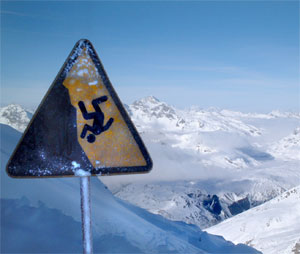
<p>On the forum I read the latest comments that Runkeeper stopped using the Pinchmedia library so your private info isn't sent anymore to a 3rd party. I compared the IP data of a old version of Runkeeper Free with a recent update and I can confirm that there is no more spyware in Runkeeper. Now I'll buy the paid version and start running!</p>]]></content:encoded></rss:item><rss:item rdf:about="http://dutchtechies.com/dutchtechies-blog/2009/9/4/snow-alert.html"><rss:title>Snow Alert!</rss:title><rss:link>http://dutchtechies.com/dutchtechies-blog/2009/9/4/snow-alert.html</rss:link><dc:creator>Captain Rtfb</dc:creator><dc:date>2009-09-04T11:57:23Z</dc:date><dc:subject>Mac Snow Leopard</dc:subject><content:encoded><![CDATA[<p><span class="full-image-float-right ssNonEditable"><span><img style="width: 200px;" src="http://dutchtechies.com/storage/SnowAlert.jpg?__SQUARESPACE_CACHEVERSION=1252068885195" alt="" /></span></span>Snow Leopard was released last week. After upgrading the OS X machines in our DutchTechies compound to Snow Leopard some of our applications stopped working.</p>
<p>What was the reason for this mayor update from Apple? At the keynote they shouted "Snow Leopard takes up less than half the disk space of the previous version, freeing about 7GB for you" - yeah right! They removed the support for the Motorola processor machines, all system files and all programs were dual installed before, until the Snow arrived. So freeing 7GB is easy, but please be honest about the reason, Apple!</p>
<p>We got stuck with several programs which are not working anymore with Snow Leopard. Please check if you are depending on these before installing 10.6:</p>
<p>&nbsp;</p>
<p><span class="full-image-float-left ssNonEditable"><span><img style="width: 50px;" src="http://dutchtechies.com/storage/cyberduck.png?__SQUARESPACE_CACHEVERSION=1252070896044" alt="" /></span></span><strong>Cyberduck</strong>&nbsp;&nbsp;&nbsp; Crashes in Snow Leopard. The author immediately released a <a href="http://update.cyberduck.ch/Cyberduck-3.3b1.zip">new beta</a>. This Beta works again!</p>
<p>&nbsp;</p>
<p><span class="full-image-float-left ssNonEditable"><span><img style="width: 50px;" src="http://dutchtechies.com/storage/truecrypt.png?__SQUARESPACE_CACHEVERSION=1252070961755" alt="" /></span></span><strong>TrueCrypt</strong>&nbsp;&nbsp;&nbsp; Not working. Some people advise to force the application to run in Rosetta-mode. But Rosette didn't help us. NOT WORKING!</p>
<p>&nbsp;</p>
<p><span class="full-image-float-left ssNonEditable"><span><img style="width: 50px;" src="http://dutchtechies.com/storage/GPGMail.gif?__SQUARESPACE_CACHEVERSION=1252070998843" alt="" /></span></span><strong>gpgMail</strong>&nbsp;&nbsp;&nbsp; &nbsp;&nbsp;&nbsp; Not working. The application was using 'forbidden Api's', which are now blocked by Apple. Apple's Mail automatically moves the plugin out of the plugin folder to have it disabled. No secure mail at this moment for us... NOT WORKING!</p>
<p>&nbsp;<br /><span class="full-image-float-left ssNonEditable"><img style="width: 50px;" src="http://dutchtechies.com/storage/images.jpg?__SQUARESPACE_CACHEVERSION=1252068221275" alt="" /></span><strong>GroupDav</strong>&nbsp;&nbsp;&nbsp; &nbsp;&nbsp;&nbsp; iCal 4.0 won't connect anymore to GroupDav.php&nbsp;&nbsp; Unclear wat was changed. NOT WORKING!</p>
<p><br /><span class="full-image-float-left ssNonEditable"><img style="width: 50px;" src="http://dutchtechies.com/storage/macports-logo-top.png?__SQUARESPACE_CACHEVERSION=1252068625160" alt="" /></span><strong>MacPorts</strong>&nbsp;&nbsp;&nbsp; &nbsp;&nbsp;&nbsp; Macports stopped working, but there is a update available already. Just 'sudo ports -v selfupdate' .</p>
<p>&nbsp;</p>
<p><span style="font-size: 70%;">Image attribution: Angeloscesare at Flickr.com</span></p>
<p>&nbsp;</p>]]></content:encoded></rss:item><rss:item rdf:about="http://dutchtechies.com/dutchtechies-blog/2009/8/19/a-magnificent-in-sheeps-clothing.html"><rss:title>A magnificent in sheep's clothing</rss:title><rss:link>http://dutchtechies.com/dutchtechies-blog/2009/8/19/a-magnificent-in-sheeps-clothing.html</rss:link><dc:creator>Captain Rtfb</dc:creator><dc:date>2009-08-19T20:31:05Z</dc:date><dc:subject></dc:subject><content:encoded><![CDATA[<p>Have you ever been working at a linux prompt and needed a serial terminal emulator? For connecting to the serial port of your mobile phone, or a modem? No need to install a terminal emulator or any Darwin tool! Say bye to minicom! The tool you need is right there in your repository, and already installed at your OSX or linux! <strong>Screen</strong>! But screen is known to be used for accessing more than one shell at a time? Yes, but it's also a serial terminal...</p>
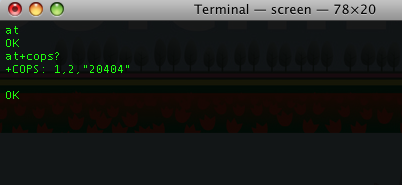
<p><span class="full-image-float-right ssNonEditable"><img src="http://dutchtechies.com/storage/Afbeelding%201.png?__SQUARESPACE_CACHEVERSION=1250714364999" alt="" /></span>In my example below I paired my Nokia via Bluetooth to my Mac. In /dev/ there's now a serial device present: <span style="font-size: 80%;">/dev/tty.Captain-COM1-1</span></p>
<p>At the osx-prompt I issue the command <strong><span style="font-size: 80%;">screen /dev/tty.Captain-COM1-1</span></strong> You can optionally add the baudrate as second parameter. And there you go!</p>
<p>Exit the terminal by the sequence ctrl-a and k.</p>
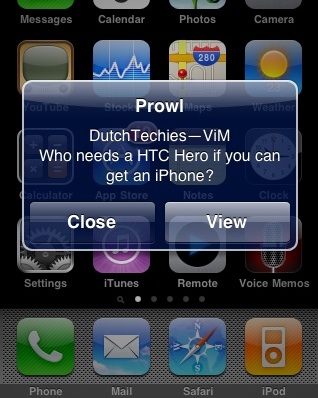
<p>&nbsp;</p>]]></content:encoded></rss:item><rss:item rdf:about="http://dutchtechies.com/dutchtechies-blog/2009/8/9/prowl-and-growl.html"><rss:title>Prowl and Growl</rss:title><rss:link>http://dutchtechies.com/dutchtechies-blog/2009/8/9/prowl-and-growl.html</rss:link><dc:creator>ViM</dc:creator><dc:date>2009-08-09T07:26:00Z</dc:date><dc:subject></dc:subject><content:encoded><![CDATA[<p><span class="full-image-float-right ssNonEditable"><span><img src="http://dutchtechies.com/storage/prowl.jpg?__SQUARESPACE_CACHEVERSION=1249803731546" alt="" /></span></span>This one is going to be an iPhone related post, but not in anyway as l33t as Shizzle's iPhone ping of death. if you haven't got an iPhone yet, go get one. Sure you can buy a HTC Hero, but why throw away the money if you can get yourself an iPhone and run cool scripts instead (right Tux?) ;). On the iPhone you're used to paying for cool apps. And be honest some apps are just worth paying for. This one, Prowl, will set you back $3.</p>
<p><a href="http://prowl.weks.net/">Prowl</a> is intended to be a <a href="http://growl.info/">growl</a> client for the iPhone. Prowl is made by<span style="font-family: 'Lucida Grande';">Zachary West, who is also a lead developer of Adium.<span style="font-family: Verdana;">If you have a Mac, you will probably have tried Growl already. Growl shows unintrusive popups from apps like Aduim, aMsn and Skype. Handy to see what's going on, without opening the actual application.</span></span></p>
<p>You can connect Growl to your prowl application on your iPhone and receive notification there. You don't have to be running the app itself, as it also comes with push service. So when you're traveling or just away from home, you can still be notified of what is happening on your home computer.</p>]]></content:encoded></rss:item><rss:item rdf:about="http://dutchtechies.com/dutchtechies-blog/2009/8/8/dimdim.html"><rss:title>DimDim</rss:title><rss:link>http://dutchtechies.com/dutchtechies-blog/2009/8/8/dimdim.html</rss:link><dc:creator>ViM</dc:creator><dc:date>2009-08-08T21:40:15Z</dc:date><dc:subject></dc:subject><content:encoded><![CDATA[<p><span class="full-image-float-right ssNonEditable"><span><img src="http://dutchtechies.com/storage/dimdim_logo2.jpg?__SQUARESPACE_CACHEVERSION=1249770917109" alt="" /></span></span>No, we're not talking about dimming the lights to save energy. Dimdim is a program with another fancy name. If you've ever used webex, you're going to like Dimdim. Working remotely is the way of the future in my opinion. Why spend hours in traffic every week, while you could have done your work from home? With todays internet speeds, it doesn't really matter if your files are in the office and your computer is at home. Of course you'll sometimes need face to face meetings, but you'll have Skype to do that. However, there are times where you need to show your colleagues what you are talking about and show a presentation or your desktop. This is where Dimdim comes in.&nbsp;</p>]]></content:encoded></rss:item><rss:item rdf:about="http://dutchtechies.com/dutchtechies-blog/2009/8/2/unboxing-holding-out-for-a-hero.html"><rss:title>Unboxing: Holding out for a Hero</rss:title><rss:link>http://dutchtechies.com/dutchtechies-blog/2009/8/2/unboxing-holding-out-for-a-hero.html</rss:link><dc:creator>Tux</dc:creator><dc:date>2009-08-02T00:46:03Z</dc:date><dc:subject>Review android hero newbie_safe phone unboxing</dc:subject><content:encoded><![CDATA[<p>It's not easy surviving without an Iphone in a world where seemingly everyone these days is walking around with them. Everywhere you look you see the shiny metallic cases. A few feet above, sometimes right next to, aforementioned shiny cases you'll often see the inanely grinning, vaguely superior smug looking mug of the owner of the thing looking at you in a compassionate sort of way. The compassion, of course, is something that all owners of any Apple product must be familiar with - subconsciously or not. It's compassion felt for anyone not brandishing, wielding, or otherwise owning an Apple product. Surely there can be no substitute for the vaunted Iphone? Surely there can be no alternative for the app store, with it's 50 gazillion apps of many shapes and sizes?</p>
<p>Well. Maybe there is.</p>
<p>While my erstwhile companions were out of the country, I took it upon myself to sneak off and perform a tiny act of rebellion. I bought an HTC Hero. I'm sure Shizzle, the Captain and Nacho would not approve. I figured: If everyone has an Iphone, why not go against the grain just a tiny bit and see if something can even get close in functionality and style to it.</p>
<p>So how does it compare? Interested? Read on...</p>]]></content:encoded></rss:item><rss:item rdf:about="http://dutchtechies.com/dutchtechies-blog/2009/8/1/were-sheep-beehhh.html"><rss:title>We're sheep! Beehhh!</rss:title><rss:link>http://dutchtechies.com/dutchtechies-blog/2009/8/1/were-sheep-beehhh.html</rss:link><dc:creator>Captain Rtfb</dc:creator><dc:date>2009-08-01T06:18:17Z</dc:date><dc:subject></dc:subject><content:encoded><![CDATA[<p><span class="full-image-float-right ssNonEditable"><span><img src="http://dutchtechies.com/storage/fabulous-las-vegas-dutch-web.jpg?__SQUARESPACE_CACHEVERSION=1249107980286" alt="" /></span></span>After a long, very long flight from Amsterdam via LA , we finally reached the Riviera Hotel on the Las Vegas Strip! We had only one day to get used to the time difference and this morning we showed up for the first sessions at Defcon.</p>
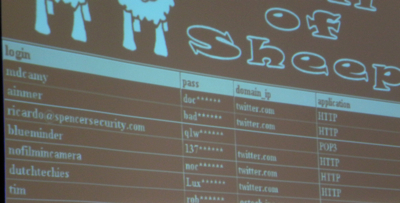
<p>We registered to the conference, but all we got was a paper badge.. Nothing electrical or to hack with it. The fancy badges were stuck at Chinese customs, but arrived later this day. Again, (credits to Joe) this year they are wonderful again. Shizzle is deep into I2C and 1940's microphones right now ;-)<br /><br />We made it to the Wall of Sheep! Yes! We chalked our name at Defcon. Instead of using our AT&amp;T 3G connection, we accessed our Twitter account via the Defcon Wifi network and sent our password plaintext by HTTP. Guess what?...<br /><br /><span class="full-image-block ssNonEditable"><span><img src="http://dutchtechies.com/storage/sheep-dutchtechies.jpg?__SQUARESPACE_CACHEVERSION=1249108517010" alt="" /></span></span></p>
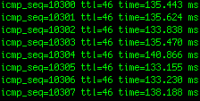
<p>So that's all for the first Defcon day. Preparing for a dip in the Riviera Pool. See you tomorrow, please watch the Wall of Sheep!</p>]]></content:encoded></rss:item><rss:item rdf:about="http://dutchtechies.com/dutchtechies-blog/2009/7/23/a-ping-of-death-for-the-iphone.html"><rss:title>A ping of death for the iPhone</rss:title><rss:link>http://dutchtechies.com/dutchtechies-blog/2009/7/23/a-ping-of-death-for-the-iphone.html</rss:link><dc:creator>Shizzle</dc:creator><dc:date>2009-07-23T15:16:19Z</dc:date><dc:subject></dc:subject><content:encoded><![CDATA[<span class="full-image-float-left ssNonEditable"><span><img src="http://dutchtechies.com/storage/Picture%20116.png?__SQUARESPACE_CACHEVERSION=1248362203834" alt="" /></span></span>The release of the 3rd generation of the iPhone was the reason for me to rush to the TMobile store to get the 32G version. I had to wait for about one week first, but finaly got one, and I love it! But there is one thing that worries me a bit. I was able to remotely drain the battery in 30-45 minutes, just by pinging the public IP address, assigned by TMobile, to the GPRS/3G interface of the phone. Is your battery draining for no reason? Is your iPhone running hot when in standby modus? Then read on...]]></content:encoded></rss:item><rss:item rdf:about="http://dutchtechies.com/dutchtechies-blog/2009/7/21/flash-on-fedora-11-not-working.html"><rss:title>Flash on Fedora 11 not working?</rss:title><rss:link>http://dutchtechies.com/dutchtechies-blog/2009/7/21/flash-on-fedora-11-not-working.html</rss:link><dc:creator>Tux</dc:creator><dc:date>2009-07-21T13:42:51Z</dc:date><dc:subject>Linux Tips and Tricks adobe fedora flash</dc:subject><content:encoded><![CDATA[<p><span class="full-image-float-left ssNonEditable"><span><img src="http://dutchtechies.com/storage/Flashbulb.jpg?__SQUARESPACE_CACHEVERSION=1248185726953" alt="" /></span></span>Hello peeps!</p>
<p>Yes, it's been a while. Do you think only Earthlings have the right to go on vacation? Sheesh.</p>
<p>This post is really not worthy of being called a post. More of a quick tip, really. Something I came across when upgrading my Fedora 10 system to Fedora 11 was that my Flash no longer worked. Most readily apparent when trying any youtube video: Video would begin to play and then a fraction of a second later the video window would turn grey and all would be lost.</p>
<p>I checked that I had the proper flashplayer installed, which it turns out I did (fresh from <a href="http://www.adobe.com">Adobe's</a> own software repository). So that couldn't be the problem. Also, this particular system on which the problem occurred was running the 32 bit Fedora 11 install, so it could have nothing to do with 64 bit issues (64 bit has caused problems in the past when running Flash).</p>
<p>A quick search of the trusty Internet yielded a perfect result:</p>
<p>Get rid of the <em>libflashsupport</em> package (yum erase libflashsupport) since this apparently no longer is necessary in Fedora 11 and throws a spanner into the works when it comes to Flash working properly.</p>
<p>After typing the above command, it worked. Like a treat..</p>
<p>Sometimes solutions are easy. I love it when that (occasionally) happens.</p>
<p>Tux lives!</p>]]></content:encoded></rss:item></rdf:RDF>